> ## Documentation Index
> Fetch the complete documentation index at: https://docs.gtm-api.com/llms.txt
> Use this file to discover all available pages before exploring further.
# Smart limits and warmup
> Per-action daily budgets protect every LinkedIn account, and a warmup ramp grows them as a new account proves itself. How budgets, holds and warmup work.
Smart limits budget how many actions of each kind a LinkedIn account may perform per
day. They are on by default for every connected account and every outbound call checks
them server-side before dispatch: work that would exceed a budget is parked, not lost.
## How budgets work
Every action type (connection requests, messages, profile visits, endorsements, and so
on) has its own daily bucket. When a bucket is spent, further actions of that kind wait
until the budget refreshes. Parked work resumes automatically as soon as the limit
releases; nothing needs re-queuing.
## Pacing: one call at a time
Inside the day, calls of one bucket leave one at a time with a gap between them. The gap is
the bucket's `delay_in_seconds`, varied by up to 20% per call; there is no burst, two calls of
one bucket never leave together. Reads are paced in single seconds, actions in tens of
seconds; connection requests and posts are deliberately slower. The number is per account and
editable (`delay_in_seconds` 1..3600), and the platform's own value for the account comes back
on every row as `recommended_delay_in_seconds`.
| Action type | Per day | One call about every |
| - | - | - |
| Connection requests | 25 | 30 s |
| Accept / ignore / withdraw / follow | 40 | 4 s |
| Messages, voice notes | 50 | 10 s |
| InMails, Sales Navigator and Recruiter messages | 30 | 23 s |
| Inbox housekeeping (read / unread, mute, attachments) | 100 | 4 s |
| Comments | 30 | 30 s |
| Reactions, endorsements | 30 | 7 s |
| Profile visits | 50 | 10 s |
| Profile edits | 10 | 30 s |
| Searches, typeaheads, engagement lists | 100 | 5 s |
| Profile, company and post reads | 80 | 5 s |
| Posts | 20 | 40 s |
| Own-account sync reads | 200 | 1 s |
| Custom requests | 60 | 5 s |
An undo (unreact, delete a comment or a post, unendorse, unfollow, withdraw a request, recall a
message) waits 2 seconds instead of the bucket's gap, so an action and its undo fit back to back.
The slot is reserved before the call leaves, so two calls fired in the same second never reach
LinkedIn together: the second one queues behind the first. What the caller sees depends on how
long the queue is:
| Wait for the slot | What happens |
| - | - |
| Up to 20 seconds | The server sleeps it. The call simply takes longer and answers normally |
| Longer | `429 rate_limited`, `context.reason` `bucket_saturated`, `cause` `delay_not_elapsed`, and `retry_after`: the moment the same call goes through |
Parallel calls on one account therefore buy nothing. Run them one after another, or spread the
work over several accounts: every account paces on its own.
A success names the same clock, so there is no need to run into the gap to learn it. Every
response whose call reached LinkedIn carries a `pacing` block:
```json theme={null}
"pacing": {
"linkedin_account_sid": "ln_ac_YOUR_ACCOUNT",
"limit_type": "send_messages",
"next_call_after": "2026-09-18T12:00:10+00:00",
"remaining_today": 46
}
```
`next_call_after` is the moment the same call goes through again without waiting: the next slot
while the day has budget left, the daily reset when it has none. `remaining_today` is what the
bucket has left after this call. A call that spends two buckets (a reaction on a post given by
link reads the post first) names the bucket of the action itself and the later of the two clocks.
On top of every bucket, one account starts at most 10 calls a minute.
 ## Warmup
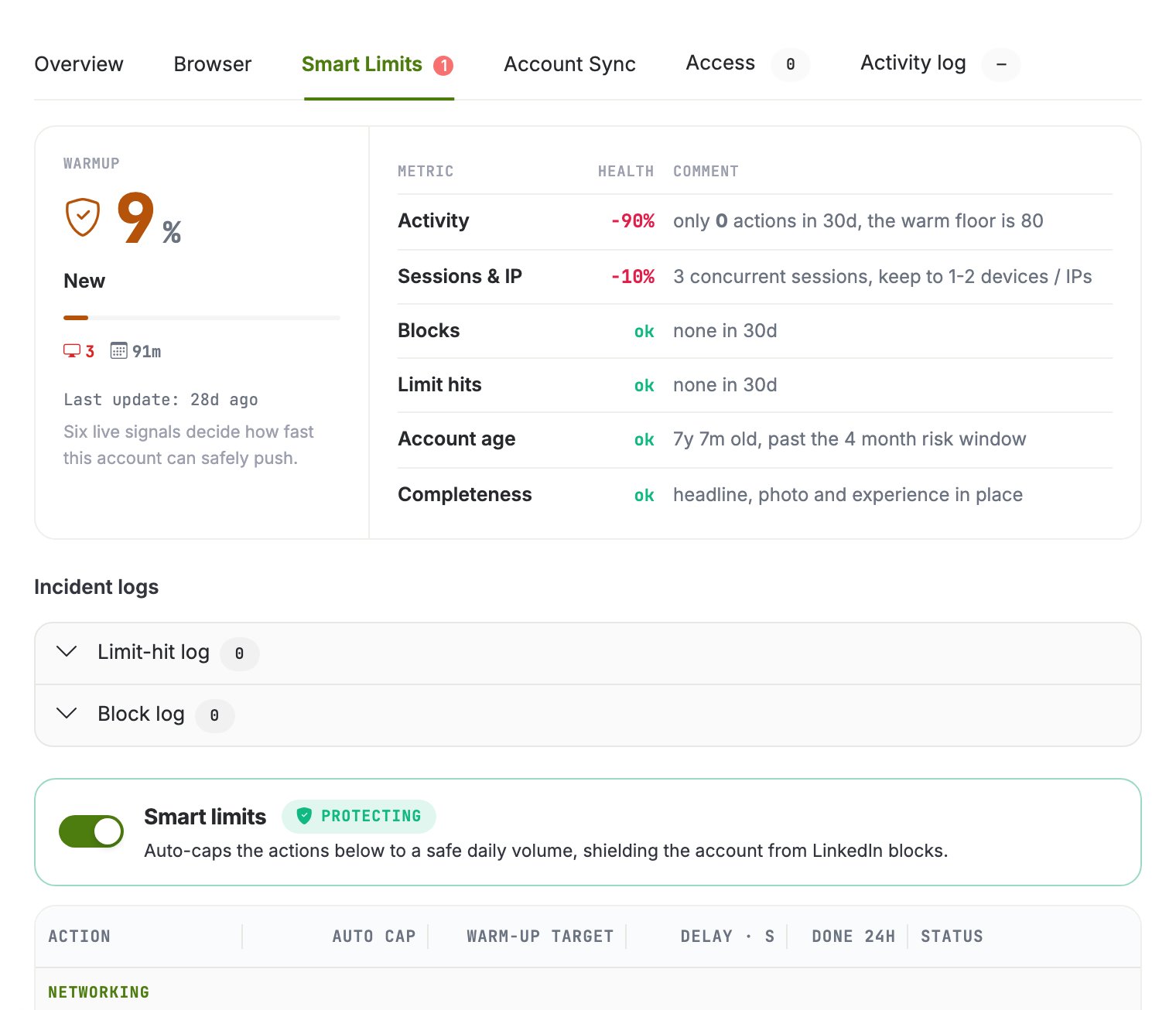
A freshly connected account starts with reduced budgets that ramp up gradually. The ramp
is driven by six live signals about the account, shown in the drawer: recent activity,
concurrent sessions and IPs, blocks, limit hits, account age, and profile completeness.
They multiply into the day's allowance.
Warmup counts real sends: activity the account actually performed matters, not just
time passed. A dormant account ramps slower than one that is actively and successfully
working.
## Limit statuses
| Status | Meaning |
| - | - |
| `active` | Budgets available, actions flow normally |
| `held` | The current budget is spent; outbound actions are parked until the refresh. The normal daily-cap state, not an error |
| `linkedin_blocked` | LinkedIn itself restricted the account; actions stay parked until the restriction clears |
## Smart limits on or off: one switch per account
Smart limits are a single switch on the account, not a setting per bucket. While they are
on, the warmup owns every daily cap and pacing number: a request that types one of them by hand
is refused with `409` and `context.reason` `smart_limits_governed`, and the answer names the
fields it refused and the two ways forward. Inside the protected mode you can still bound a
bucket with `target_limit` (the cap follows `min(smart, target)` at once) and pin the learner
with `learning_enabled`.
Turning the switch off hands every number to you: the caps run exactly as typed and the warmup
never touches the account again. That is where accounts get lost, so the drawer asks in words
before switching off, and the MCP tool previews before it commits. Turning it back on
re-derives every cap from the latest snapshot on the spot.
```bash set-smart-limits theme={null}
# Take an account off the warmup (or put it back with "enabled": true)
curl -X POST "https://app.gtm-api.com/linkedin/v4/api/linkedin-accounts/ln_ac_YOUR_ACCOUNT/set-smart-limits" \
-H "Authorization: Bearer gtm_live_YOUR_KEY" \
-H "Content-Type: application/json" \
-d '{"enabled": false}'
```
## Raise a limit, release a hold
With smart limits off, limits are editable per account in the drawer. Raising a limit offers
**reset hold**, which atomically raises the budget and resumes everything parked on it in one
step. Without reset hold, the raised budget takes effect on the next refresh cycle.
```bash curl theme={null}
# Read an account's current buckets and what is spent today
curl -X POST "https://app.gtm-api.com/linkedin/v4/api/linkedin-account-smart-limits/search" \
-H "Authorization: Bearer gtm_live_YOUR_KEY" \
-H "Content-Type: application/json" \
-d '{"filter": {"linkedin_account_sid": {"eq": "ln_ac_YOUR_ACCOUNT"}}}'
```
```bash reset-hold theme={null}
# Raise a bucket and release its hold in one step
curl -X POST "https://app.gtm-api.com/linkedin/v4/api/linkedin-account-smart-limits/lm_sl_YOUR_LIMIT/reset-hold" \
-H "Authorization: Bearer gtm_live_YOUR_KEY" \
-H "Content-Type: application/json" \
-d '{}'
```
Hitting a budget, a hold or a pacing gap longer than 20 seconds over the API answers
`429 rate_limited` with `context.reason` `bucket_saturated`, the `cause` (`daily_saturation`,
`held`, `delay_not_elapsed` or `linkedin_quota_hit`) and a `retry_after` timestamp. Inside a
mass action the item is parked on that clock and resumes on its own; a direct call retries at
`retry_after`, not earlier: an earlier retry is refused again with the same timestamp. The
account is not penalized for your retry logic.
## Related
* [Sync windows and auto-suspend](/kb/sync-windows-and-auto-suspend)
* [Antidetect browsers and proxies](/kb/antidetect-browsers-and-proxies)
* [Run a mass action](/guides/run-a-mass-action)
This documentation is built and hosted on [Mintlify](https://mintlify.com), a developer documentation platform.
## Warmup
A freshly connected account starts with reduced budgets that ramp up gradually. The ramp
is driven by six live signals about the account, shown in the drawer: recent activity,
concurrent sessions and IPs, blocks, limit hits, account age, and profile completeness.
They multiply into the day's allowance.
Warmup counts real sends: activity the account actually performed matters, not just
time passed. A dormant account ramps slower than one that is actively and successfully
working.
## Limit statuses
| Status | Meaning |
| - | - |
| `active` | Budgets available, actions flow normally |
| `held` | The current budget is spent; outbound actions are parked until the refresh. The normal daily-cap state, not an error |
| `linkedin_blocked` | LinkedIn itself restricted the account; actions stay parked until the restriction clears |
## Smart limits on or off: one switch per account
Smart limits are a single switch on the account, not a setting per bucket. While they are
on, the warmup owns every daily cap and pacing number: a request that types one of them by hand
is refused with `409` and `context.reason` `smart_limits_governed`, and the answer names the
fields it refused and the two ways forward. Inside the protected mode you can still bound a
bucket with `target_limit` (the cap follows `min(smart, target)` at once) and pin the learner
with `learning_enabled`.
Turning the switch off hands every number to you: the caps run exactly as typed and the warmup
never touches the account again. That is where accounts get lost, so the drawer asks in words
before switching off, and the MCP tool previews before it commits. Turning it back on
re-derives every cap from the latest snapshot on the spot.
```bash set-smart-limits theme={null}
# Take an account off the warmup (or put it back with "enabled": true)
curl -X POST "https://app.gtm-api.com/linkedin/v4/api/linkedin-accounts/ln_ac_YOUR_ACCOUNT/set-smart-limits" \
-H "Authorization: Bearer gtm_live_YOUR_KEY" \
-H "Content-Type: application/json" \
-d '{"enabled": false}'
```
## Raise a limit, release a hold
With smart limits off, limits are editable per account in the drawer. Raising a limit offers
**reset hold**, which atomically raises the budget and resumes everything parked on it in one
step. Without reset hold, the raised budget takes effect on the next refresh cycle.
```bash curl theme={null}
# Read an account's current buckets and what is spent today
curl -X POST "https://app.gtm-api.com/linkedin/v4/api/linkedin-account-smart-limits/search" \
-H "Authorization: Bearer gtm_live_YOUR_KEY" \
-H "Content-Type: application/json" \
-d '{"filter": {"linkedin_account_sid": {"eq": "ln_ac_YOUR_ACCOUNT"}}}'
```
```bash reset-hold theme={null}
# Raise a bucket and release its hold in one step
curl -X POST "https://app.gtm-api.com/linkedin/v4/api/linkedin-account-smart-limits/lm_sl_YOUR_LIMIT/reset-hold" \
-H "Authorization: Bearer gtm_live_YOUR_KEY" \
-H "Content-Type: application/json" \
-d '{}'
```
Hitting a budget, a hold or a pacing gap longer than 20 seconds over the API answers
`429 rate_limited` with `context.reason` `bucket_saturated`, the `cause` (`daily_saturation`,
`held`, `delay_not_elapsed` or `linkedin_quota_hit`) and a `retry_after` timestamp. Inside a
mass action the item is parked on that clock and resumes on its own; a direct call retries at
`retry_after`, not earlier: an earlier retry is refused again with the same timestamp. The
account is not penalized for your retry logic.
## Related
* [Sync windows and auto-suspend](/kb/sync-windows-and-auto-suspend)
* [Antidetect browsers and proxies](/kb/antidetect-browsers-and-proxies)
* [Run a mass action](/guides/run-a-mass-action)
This documentation is built and hosted on [Mintlify](https://mintlify.com), a developer documentation platform.