> ## Documentation Index
> Fetch the complete documentation index at: https://docs.gtm-api.com/llms.txt
> Use this file to discover all available pages before exploring further.
# Sync windows and auto-suspend
> Recurring syncs run inside each account's configured hours, idle browsers suspend themselves, and due work wakes them. What is window-gated and what is not.
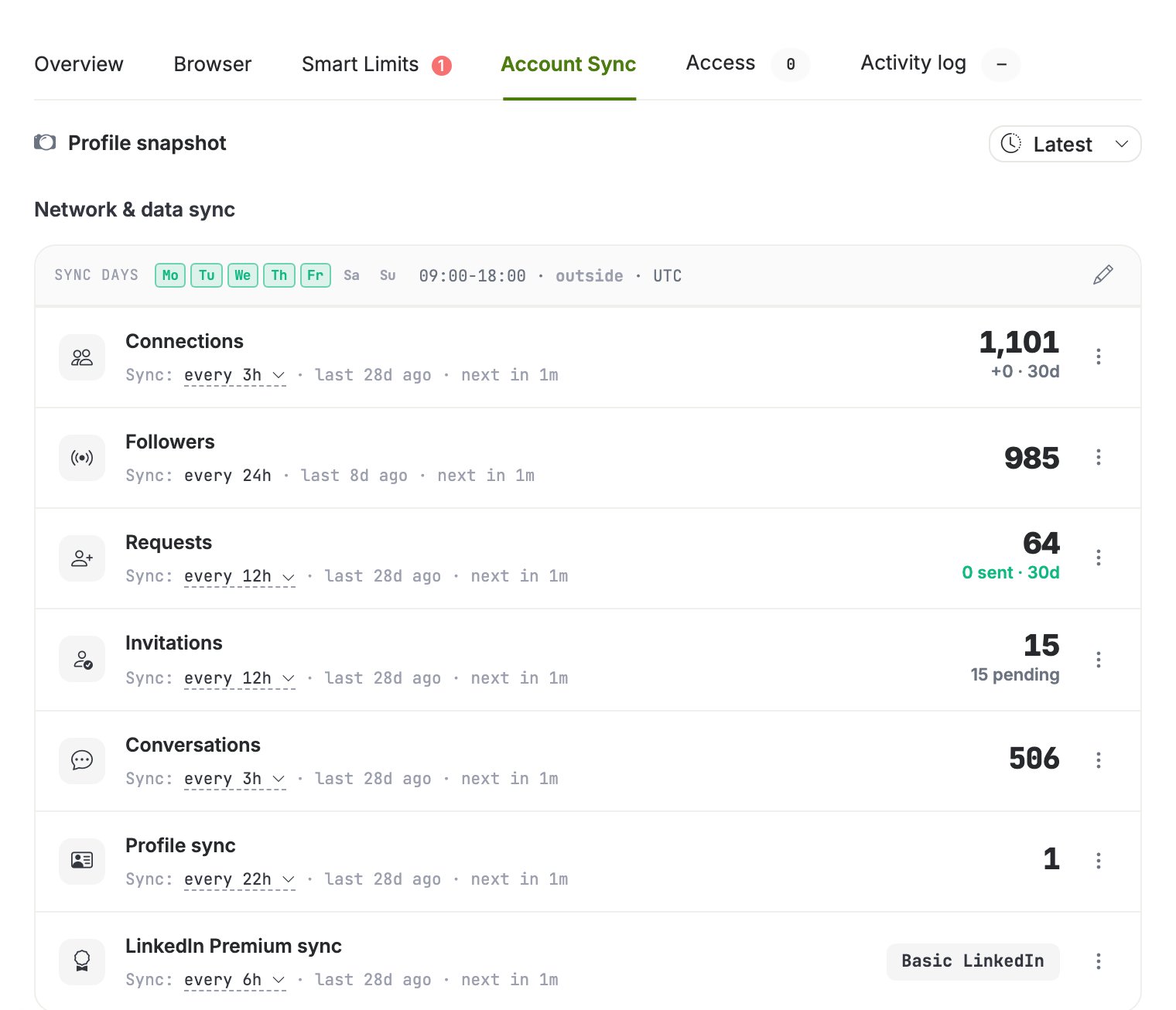
Each LinkedIn account has a **sync window**: the days and hours during which recurring
synchronizations (inbox, connections, invitations, followers) are created and picked
up. Outside the window no new recurring sync starts.
A newly connected account starts on business hours, Monday to Friday 09:00-18:00, in
your workspace timezone. Change it whenever you like on the Account Sync tab.
An account with no window at all syncs **around the clock**, every day. That is what
accounts connected before this default existed do, and it is what you get if you switch
every day off. Emptying the window opens the account up rather than pausing it; to stop
an account from working, stop its browser instead.
 ## What the window gates, and what it does not
* **Recurring syncs are window-gated.** Conversations, connections, invitations,
followers and profile refreshes are scheduled only inside the configured hours.
* **Actions are not.** Sending a message or a connection request runs whenever you or
an automation triggers it, at any hour, subject to
[smart limits](/kb/smart-limits-and-warmup).
* **The first import ignores the window.** The initial backfill of a freshly connected
account runs to completion whatever the hours say, so onboarding never stalls
overnight. Smart limits and pacing still apply. Only the recurring syncs that follow
it are gated.
Edit the window and the per-kind intervals on the **Account Sync** tab of the account
drawer. Each sync kind shows its interval, the last run and the next due time.
## Browser auto-suspend and wake
A running antidetect browser costs resources, so idle browsers suspend automatically:
after about 15 minutes without activity the platform stops the browser.
Waking is automatic too:
* an **action** waits for the browser to start, then runs;
* a due **sync** wakes the browser in the background.
You never need to start browsers manually for scheduled work. A browser you stopped
yourself stays stopped for manual use, but due syncs and actions still wake it.
## Health checks
The platform periodically verifies that each running browser is actually responsive. A
browser whose LinkedIn tab is dead is marked with an issue status and powered off rather
than left running blind; the account's sync state shows the reason.
## Change the schedule over the API
The window is a list of per-weekday entries in the account's timezone, minutes from
local midnight. Weekdays 1 to 5 (Monday to Friday), 09:00 to 18:00:
```bash curl theme={null}
curl -X POST "https://app.gtm-api.com/linkedin/v4/api/linkedin-accounts/ln_ac_YOUR_ACCOUNT/update-sync-config" \
-H "Authorization: Bearer gtm_live_YOUR_KEY" \
-H "Content-Type: application/json" \
-d '{
"sync_config": {
"timezone": "Europe/Amsterdam",
"window": [
{"day_of_week": 1, "start_minute": 540, "end_minute": 1080},
{"day_of_week": 2, "start_minute": 540, "end_minute": 1080},
{"day_of_week": 3, "start_minute": 540, "end_minute": 1080},
{"day_of_week": 4, "start_minute": 540, "end_minute": 1080},
{"day_of_week": 5, "start_minute": 540, "end_minute": 1080}
]
}
}'
```
```typescript TypeScript theme={null}
const window = [1, 2, 3, 4, 5].map((day_of_week) => ({
day_of_week, // ISO weekday: 1=Mon … 7=Sun
start_minute: 9 * 60, // minutes from local midnight
end_minute: 18 * 60,
}));
await fetch(
"https://app.gtm-api.com/linkedin/v4/api/linkedin-accounts/ln_ac_YOUR_ACCOUNT/update-sync-config",
{
method: "POST",
headers: {
Authorization: "Bearer gtm_live_YOUR_KEY",
"Content-Type": "application/json",
},
body: JSON.stringify({
sync_config: { timezone: "Europe/Amsterdam", window },
}),
},
);
```
Omit `window`, or send it as an empty list, to sync around the clock. Both mean the
same thing, and neither switches syncing off. Per-kind intervals ride the same
request's `entries` object.
Field names and the full request shape are in the
[API reference](/api-reference/overview); to change the schedule for every account on
the team in one confirmation, use a [mass action](/guides/run-a-mass-action).
## Related
* [Antidetect browsers and proxies](/kb/antidetect-browsers-and-proxies)
* [Smart limits and warmup](/kb/smart-limits-and-warmup)
This documentation is built and hosted on [Mintlify](https://mintlify.com), a developer documentation platform.
## What the window gates, and what it does not
* **Recurring syncs are window-gated.** Conversations, connections, invitations,
followers and profile refreshes are scheduled only inside the configured hours.
* **Actions are not.** Sending a message or a connection request runs whenever you or
an automation triggers it, at any hour, subject to
[smart limits](/kb/smart-limits-and-warmup).
* **The first import ignores the window.** The initial backfill of a freshly connected
account runs to completion whatever the hours say, so onboarding never stalls
overnight. Smart limits and pacing still apply. Only the recurring syncs that follow
it are gated.
Edit the window and the per-kind intervals on the **Account Sync** tab of the account
drawer. Each sync kind shows its interval, the last run and the next due time.
## Browser auto-suspend and wake
A running antidetect browser costs resources, so idle browsers suspend automatically:
after about 15 minutes without activity the platform stops the browser.
Waking is automatic too:
* an **action** waits for the browser to start, then runs;
* a due **sync** wakes the browser in the background.
You never need to start browsers manually for scheduled work. A browser you stopped
yourself stays stopped for manual use, but due syncs and actions still wake it.
## Health checks
The platform periodically verifies that each running browser is actually responsive. A
browser whose LinkedIn tab is dead is marked with an issue status and powered off rather
than left running blind; the account's sync state shows the reason.
## Change the schedule over the API
The window is a list of per-weekday entries in the account's timezone, minutes from
local midnight. Weekdays 1 to 5 (Monday to Friday), 09:00 to 18:00:
```bash curl theme={null}
curl -X POST "https://app.gtm-api.com/linkedin/v4/api/linkedin-accounts/ln_ac_YOUR_ACCOUNT/update-sync-config" \
-H "Authorization: Bearer gtm_live_YOUR_KEY" \
-H "Content-Type: application/json" \
-d '{
"sync_config": {
"timezone": "Europe/Amsterdam",
"window": [
{"day_of_week": 1, "start_minute": 540, "end_minute": 1080},
{"day_of_week": 2, "start_minute": 540, "end_minute": 1080},
{"day_of_week": 3, "start_minute": 540, "end_minute": 1080},
{"day_of_week": 4, "start_minute": 540, "end_minute": 1080},
{"day_of_week": 5, "start_minute": 540, "end_minute": 1080}
]
}
}'
```
```typescript TypeScript theme={null}
const window = [1, 2, 3, 4, 5].map((day_of_week) => ({
day_of_week, // ISO weekday: 1=Mon … 7=Sun
start_minute: 9 * 60, // minutes from local midnight
end_minute: 18 * 60,
}));
await fetch(
"https://app.gtm-api.com/linkedin/v4/api/linkedin-accounts/ln_ac_YOUR_ACCOUNT/update-sync-config",
{
method: "POST",
headers: {
Authorization: "Bearer gtm_live_YOUR_KEY",
"Content-Type": "application/json",
},
body: JSON.stringify({
sync_config: { timezone: "Europe/Amsterdam", window },
}),
},
);
```
Omit `window`, or send it as an empty list, to sync around the clock. Both mean the
same thing, and neither switches syncing off. Per-kind intervals ride the same
request's `entries` object.
Field names and the full request shape are in the
[API reference](/api-reference/overview); to change the schedule for every account on
the team in one confirmation, use a [mass action](/guides/run-a-mass-action).
## Related
* [Antidetect browsers and proxies](/kb/antidetect-browsers-and-proxies)
* [Smart limits and warmup](/kb/smart-limits-and-warmup)
This documentation is built and hosted on [Mintlify](https://mintlify.com), a developer documentation platform.